
Wave vs Xactimate: The Restoration Estimating Comparison for 2026
An honest, operator-voice comparison of Xactimate's 40-year legacy product against Wave's AI-native approach. Pricing, workflows, and who each tool is really for.
Xactimate rewards mastery. Wave shares it.
Xactimate was built for experts who know 15,000 codes and three certification classes. Wave was built so anyone on your team can produce the same quality estimate, from the technician on their first day to the senior adjuster who has seen every loss type twice.
If you have ever paid a Xactimate invoice, trained a new estimator, or waited for a senior team member to write a scope that a technician already walked, this comparison is written for you.
The core claim
Xactimate has been around since 1986. It is 40 years old, originally released as a desktop application for early Macintosh computers, now owned by Verisk Analytics and used by most of the top property insurance carriers in North America. The product is powerful. It is also the product of 40 years of accumulated complexity, built for a different era of computing and a different era of restoration.
Wave is the opposite. AI-native, voice-first, and designed so the person doing the work can write the estimate. You do not need to memorize 15,000 codes. You do not need three levels of certification. You do not need to come back to the office to write the estimate you just walked through. You just describe the job. Wave does the rest.
The difference is not AI versus no AI. It is a tool built for experts versus a tool built to make every person on the claim an expert.
At a glance
| Wave | Xactimate | |
|---|---|---|
| Input method | Voice or text, conversational | Menu navigation through code trees |
| Training to competency | First estimate on day one | About 90 days minimum, three certification levels for mastery |
| Intelligence | AI-generated scope, auto-sized equipment, auto-generated notes | None. Manual entry end to end |
| Time per estimate | 10 to 15 minutes | Hours, varying by user experience |
| Platform | Web, mobile, desktop. Same experience everywhere | Windows desktop primary. Mac requires emulators. Mobile app exists but manual-heavy |
| Pricing model | Flat monthly, unlimited users | Per seat, plus possible per-upload or percentage fees depending on program |
| Regional pricing | Automatic, curated, keyed to the loss address | Automatic, 15,000+ codes, monthly release but not every code updates monthly |
| Export | Professional PDF, branded letterhead, multi-location support | ESX, PDF, carrier-specific formats |
| Ideal user | Anyone on the claim | Users with three certification classes and time to use them |
How Wave actually works
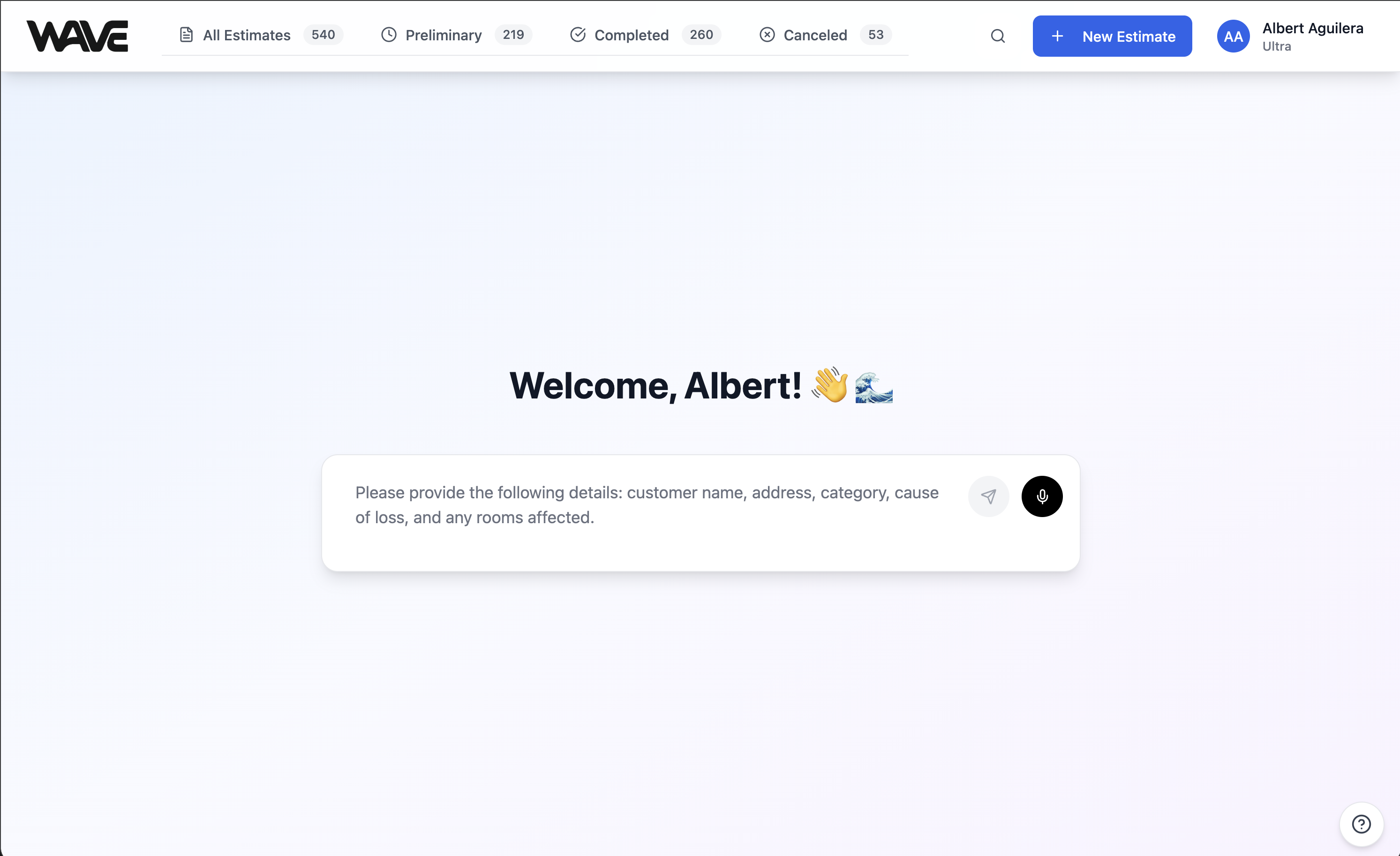
Open Wave. No menus, no code trees, no blank canvas staring back at you. There is one chat box and a short greeting.
You type or speak what you see on site. Customer name, address, loss category, cause of loss, which rooms are affected. Wave pulls the scope out of natural language and asks short follow-up questions to fill in what is missing. Most of those questions are multiple choice. Tap A, B, C, or D and keep moving. You are on site. You are holding a moisture meter. You are not typing paragraphs.
When Wave has enough information, it generates the complete estimate. Line items grouped by room, with subtotals. Equipment sized from the room dimensions you provided, using IICRC drying science. PPE kit auto-added and scaled to the loss category. Containment barriers, antimicrobial application, HEPA vacuuming on exposed framing, and every line item a senior estimator would know to add.
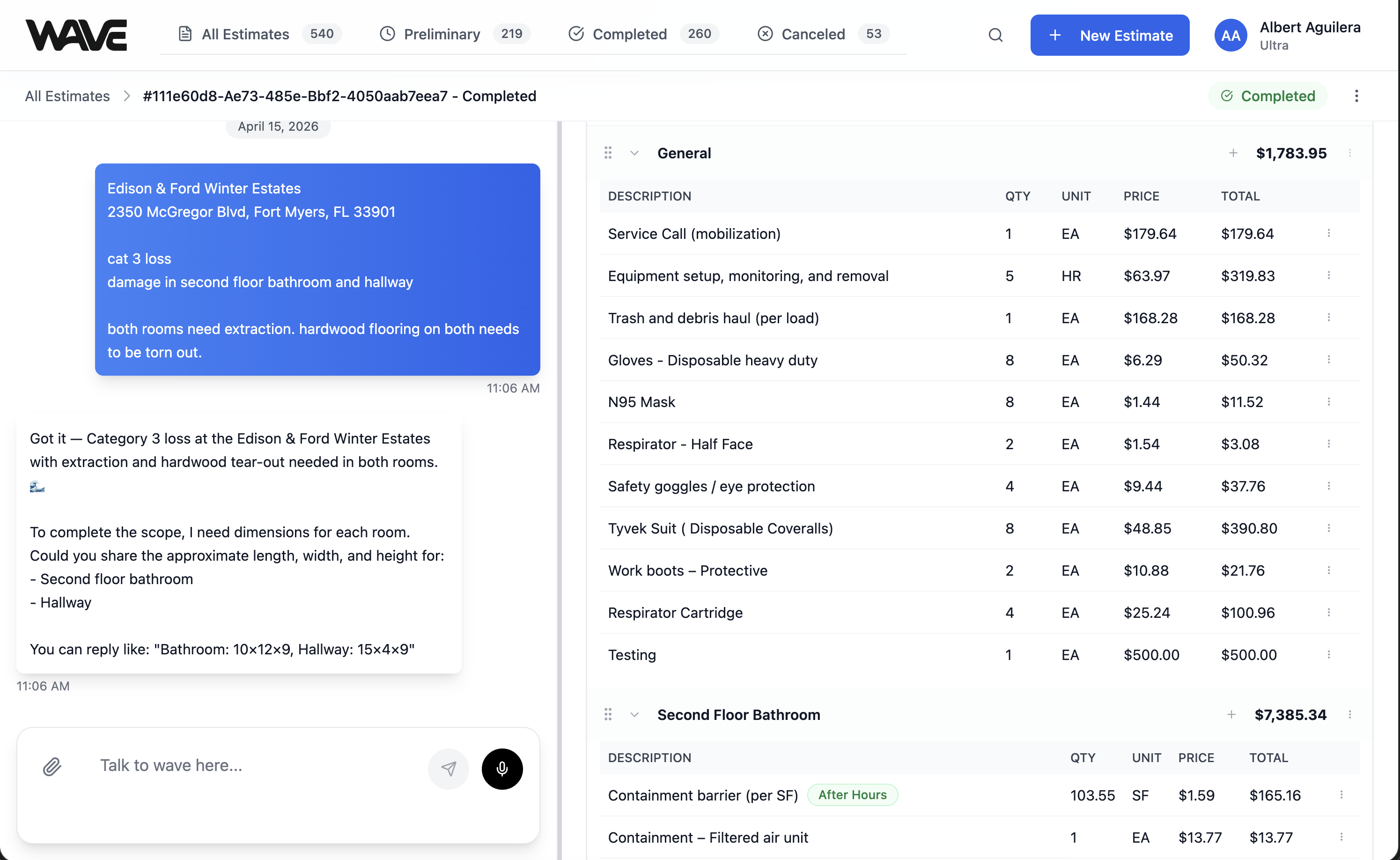
Every line item self-documents. Under the fan line, Wave notes the equipment count and duration. Under the floor protection line, Wave explains why it is there. Under the testing line, Wave references the post-remediation clearance requirement. Your adjuster reads the estimate and does not have to ask questions because the answers are already written.
Need to edit? Click any line item. Description, quantity, unit, and price become editable inline. Type a math expression like 5'6 times 3'4 in the quantity field and Wave resolves it to square feet. Hit the green check. Done.
Need to talk to Wave again? Type in the chat. "Change the bathroom drying period to 7 days." Wave updates the equipment, recalculates, and tells you exactly what changed and how it affected the total.
Export when you are ready. Professional PDF with your company letterhead, ready to send to an adjuster.
Total time from scope to export: typically 10 to 15 minutes. On the job site.
How Xactimate works
Open the desktop app. Xactimate is Windows-primary. Mac users need emulators or remote desktops. The mobile version exists but is manual-heavy with no intelligence built in.
Create a new estimate. Set the price list by region. Set the loss type. Set the claim type. Set the carrier. Confirm the policyholder.
Now you build. Navigate to the trade category. Select the subcategory. Find the line item code. Type the quantity. Type the unit price or accept the regional default. Type the notes. Repeat for every line item in the scope, one at a time. A competent estimator for a Cat 3 sewage loss with a bathroom and hallway might enter 40 to 60 line items manually.
Apply modifiers per line item by opening a lookup menu and selecting from a list of codes. After Hours. Category 3. Heavy Cleaning. You need to know which modifiers apply to which line items and which combinations make sense.
Build the sketch if the claim requires one. Save as ESX. Export. Email the adjuster.
Xactimate has no intelligence baked in. It relies entirely on the knowledge you bring to it. If you do not know a line item should be there, it will not remind you. If you do not know which modifier to apply, it will not suggest one. If you do not know drying science, it will not size your equipment. Xactimate is a very powerful blank canvas that requires you to paint the picture yourself.
That knowledge takes about 90 days to build, minimum. True proficiency typically requires completing three levels of Xactimate certification classes. Most restoration companies send their people to these classes because there is no faster way to make them productive.
The real cost difference
Xactimate charges per seat. Wave charges per organization. That one difference is the entire cost story, but it plays out in real dollars depending on your team size.
| Team size | Xactimate seats ($139/mo each) | Wave best-fit plan (annual billing, 2 months free) | Annual savings with Wave |
|---|---|---|---|
| 1 person | $1,668/year | $1,990/year on Wave Starter annual | Comparable at 1 seat |
| 3 people | $5,004/year | $2,990/year on Wave Basic annual | $2,014/year |
| 5 people | $8,340/year | $4,990/year on Wave Pro annual | $3,350/year |
| 10 people | $16,680/year | $4,990/year on Wave Pro annual | $11,690/year |
| 20 people | $33,360/year | $4,990/year on Wave Pro annual | $28,370/year |
| 50 people | $83,400/year | $4,990/year on Wave Pro annual | $78,410/year |
Xactimate Pro seat licenses start around $139 per user per month and vary by program and plan tier. Some contractor programs, including franchises, TPA networks, and carrier-direct assignment programs, also charge per-upload assignment fees or percentage-based fees on every estimate submitted. Depending on your volume, those additional fees can add hundreds to thousands of dollars monthly on top of the seat licenses. These fees are often invisible in published Xactimate pricing because they are tied to individual programs rather than the base product.
Wave is the opposite. Flat monthly subscription, unlimited users, no per-upload fees, no percentage cuts, no metered usage. What you see is what you pay. Wave Starter is $199 per month. Basic is $299 per month. Pro is $499 per month for high volume estimating. Save two months when you pay annually.
Even at the one-seat count where Xactimate looks competitive on paper, the per-upload fees and percentage program fees often tilt the real cost back to Wave. And the moment you add a second, third, or fourth person to your team, the gap widens fast.
Why Wave wins
Voice-first, not menu-first
Xactimate starts with an empty canvas and 15,000 codes. Wave starts with a single question. Anyone on the crew can run it. A technician on their first day can produce a useful first-draft estimate without opening a single menu or memorizing a single code. The senior estimator can then review the draft instead of building it from scratch. That one shift turns estimating from a solo bottleneck into a team sport.
The AI thinks like a senior estimator
Wave adds the line items you would forget. HEPA vacuuming on exposed framing. Plant-based antimicrobial on affected surfaces. Equipment decontamination on every piece of gear that entered a Cat 3 environment. Proper containment per IICRC standards. Testing line items for post-remediation verification when the loss category calls for it.
Wave auto-sizes your air movers and dehumidifiers based on the room dimensions you gave it. Not rules of thumb, not guesswork, but actual drying science applied to your actual measurements. And it writes defensible notes on every line item explaining why it is there.
A technician on their first week, using Wave, produces an estimate that looks like the work of a senior estimator with three certifications. That is the entire product thesis in one sentence.
Quantities that accept anything
Type a math expression directly into the quantity field. "5'6 times 3'4" resolves to square feet. "200 times 2" calculates wall surface area. "8 plus 12 plus 14" adds room runs together. Any standard expression works, and Wave evaluates it instantly without switching modes.
Xactimate supports unit entry too, through specific field formats. Wave just lets you type what makes sense and moves on. A small thing, but it removes friction from the one interaction you repeat more than any other: entering quantities.
Mobile that was actually built for mobile
Wave works the same on your phone as it does on your desktop. Split view on desktop shows chat on the left and estimate details on the right. On mobile, tap to flip between the two. Both views are fast, clean, and built for the way restoration work actually happens, which is in the field, standing in a flooded bathroom, one hand holding your phone.
Xactimate Mobile exists. Ask anyone who uses it how they feel about it. It is a port of a desktop experience onto a small screen. Wave was designed mobile-first from the beginning.
Inline edits, natural revisions
Type a new quantity, hit enter, done. Or talk to Wave in the chat. "Change the hallway drying period to 7 days." Wave updates every related line item, recalculates the total, and tells you exactly what changed. No panels to open, no modals to close, no menus to navigate.
Xactimate edits are clicks on clicks on clicks.
One subscription, no surprises
Every technician, project manager, and office admin can be in Wave. No per-seat charges. No per-upload assignment fees. No percentage-based program fees. No metered exports. One flat monthly subscription, and your team is covered.
Where Xactimate wins
Three scenarios, honestly.
You already have three levels of Xactimate certification and a workflow built around the software that you genuinely prefer.
Your workflow depends on every line transferring into Xactimate every time. Wave exports to Xactimate and tells you upfront if anything in a particular estimate will not carry over, but if a single excluded line is a problem for you, working natively avoids the question entirely.
You need the deepest possible code library with 15,000 plus line items and the most granular regional pricing variations that exist in the industry.
For everyone else, Wave wins.
Who should switch
Restoration contractors who want their whole team estimating, not just their senior estimator.
Growing operations where training new hires on Xactimate is a real line item in your hiring budget.
Franchise and TPA operators looking to cut per-seat and per-upload fees.
Adjusters and carrier teams onboarding new staff who do not have three months to spend getting someone productive.
Restoration operators who do the work on-site and do not want to come back to the office at 8 PM to write the estimate they could have written from the field.
Anyone who has ever thought there has to be a better way to do this while staring at a Xactimate code tree.
Try Wave free. 3 estimates included. No credit card required. →
Frequently Asked Questions
Does Wave export to Xactimate (ESX format)?
Yes. Open the estimate, choose the Xactimate export, and Wave builds the file for you to import. From there it is a normal Xactimate estimate: rooms, line items, and quantities intact, reviewable and editable like anything else in that system. It is available on Basic and above, and included in the free trial.
Most Wave customers still send PDFs, because adjusters accept them and it is fewer steps. The Xactimate export is there for the carriers and TPAs that require the file itself.
What pricing database does Wave use?
Wave prices every line from a restoration-specific catalog curated by our own team, adjusted to the loss address through our regional modifier table covering US ZIP and Canadian postal codes. When a job calls for an item outside that catalog, Wave falls back to a broader industry price list so the estimate stays complete.
However a line is priced, the calculation is deterministic. The AI decides scope; a rules engine with no AI anywhere in the path decides quantity and price. The same loss described the same way produces the same number every time. And every estimate pins the price basis it was built on, so a later pricing update never silently reprices a job already in progress.
The part that matters day to day: nobody on your team memorizes any of it. Wave picks the line items from a description of the job, so writing an estimate never means learning 15,000 codes first.
How is Wave accurate without Xactimate's code library?
Because 15,000 codes is a liability, not a feature, for most restoration estimates. Most water, fire, and mold losses use a few hundred line items at most. Wave covers the common scopes thoroughly and auto-generates the ones you would otherwise forget. The accuracy comes from the AI catching what a human would miss, not from having more codes.
Do insurance adjusters accept Wave estimates?
Yes. Wave estimates export as professional PDFs with all line items, pricing, and auto-generated notes formatted the way adjusters expect. Our customers submit Wave estimates to carriers routinely. Adjusters are used to receiving PDF estimates from many sources and evaluate them on scope and documentation quality, not the software that produced them.
What happens to my existing Xactimate estimates if I switch?
Nothing. Your historical Xactimate estimates stay in Xactimate. Wave is the tool you use going forward. Many teams run both during transition, using Wave for new estimates and Xactimate only when a specific carrier integration requires an ESX file.
Is Wave good for catastrophe deployments and storm events?
This is where Wave shines. During CAT events, the bottleneck is almost always estimator capacity. Wave lets you put anyone on the team into the field producing estimates. A newer technician can scope a job and generate a complete estimate in 15 minutes. Senior people review instead of writing. Your throughput multiplies.
Wave was built by a restoration operator for restoration operators. If you have spent a single weekend rebuilding a Xactimate estimate, you already know why it exists.
Related Articles
Wave vs Rebuild: The AI Restoration Estimating Comparison
Rebuild asks for your historical estimates to train their AI. Wave ships ready to work. An operator's honest look at pricing, contracts, and training data.
Wave vs DocuSketch: Workflow vs the Estimate Itself
DocuSketch captures, scopes, and hands off to Xactimate. Wave writes the estimate itself. A fair breakdown of pricing, workflow, and AI.
Wave vs Encircle: Documentation Platform or the Estimate Itself
Encircle documents the loss. Xactimate prices it. Wave does both in one tool. An operator's look at real monthly costs and the 2026 AI push.