
How Wave Works
Chat and estimate, side by side
Tell Wave what happened and watch the estimate build beside you. Every job has a chat next to whatever tab you're on, and you can edit the estimate by telling Wave or by hand.
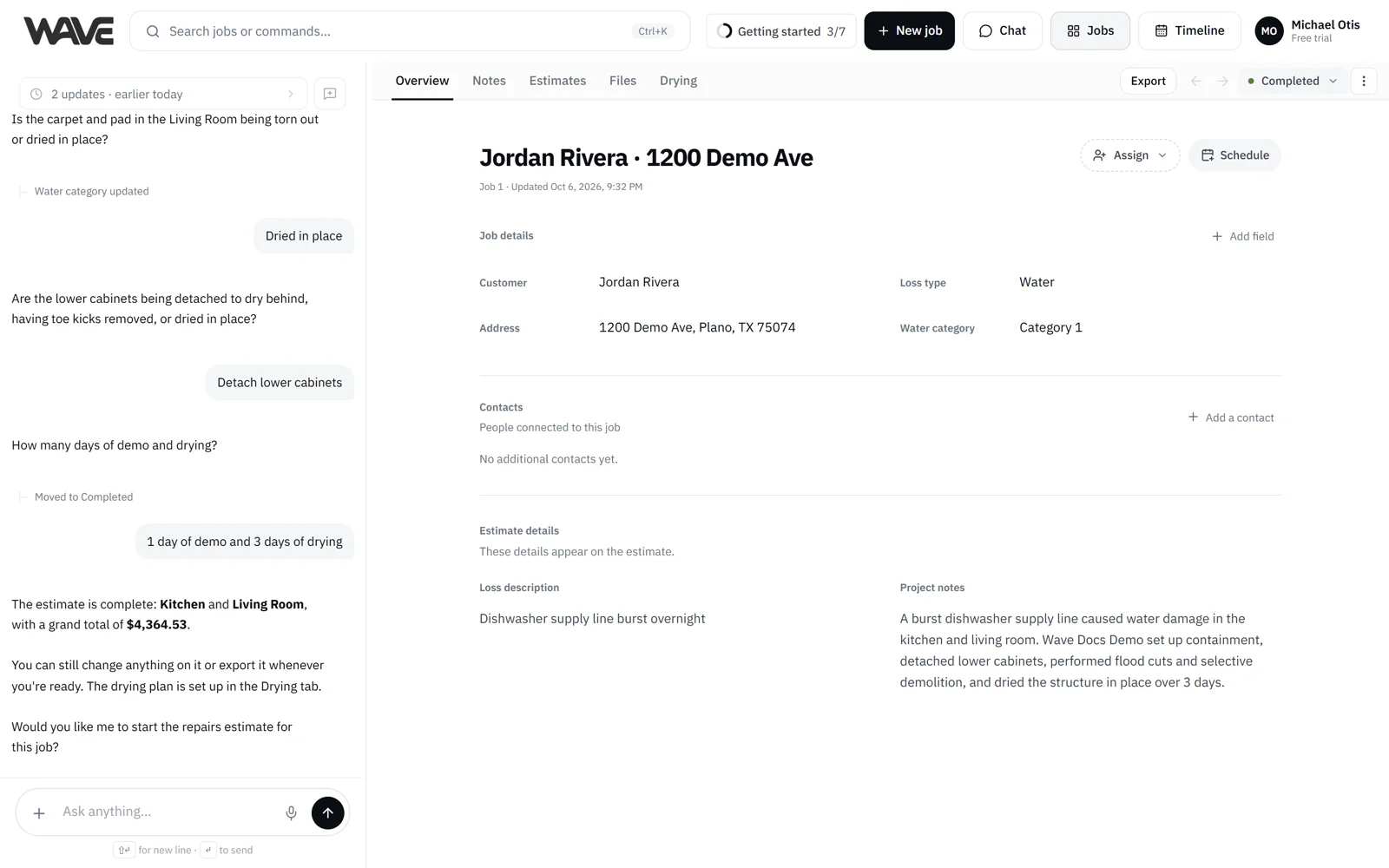
Tell Wave what happened and watch the estimate build beside you. Every job has a chat with Wave next to whatever tab you're on: Overview, Notes, Estimates, Files, or Drying on plans that include drying logs. Talk through the loss in the field, then fix any line by hand without leaving the job.
What you get
The chat is what makes Wave fast, on site or at the desk. The estimate is what makes the result reviewable and exportable. You talk to Wave on one side and see the estimate and job details on the other, and you can fix anything from either side without leaving the job.
Talk to Wave
The chat is where you tell Wave what happened and what you need. Wave asks only what it needs to get the estimate right. Some questions have tap-to-answer choices, and the mic gives you dictation. You can write or speak in English, Spanish or French.
Your conversation follows where you are. Moving between a job's tabs keeps the same conversation, so Wave still knows the job you're on. Home, the Jobs board, the Timeline and the Chat page share one conversation. When you move to another job or place, earlier messages fold into the history row at the top of the chat, where you can still read them. New chat starts a clean conversation, and if Wave was waiting on an answer, Pick up resumes it from any tab.
See the estimate and job details
The estimate appears on the Estimates tab: a General section for job-wide items, a section per room with its subtotal, and the grand total. Customer and loss details live on Overview, and your team's notes live on Notes, where Wave reads them so it doesn't ask again. Estimate actions such as lock, duplicate (on paid plans) and estimate history are in the Job actions (⋮) menu, which also lets you cancel or reopen the job and, for Admins, archive it.
Edits go both ways
You can change the estimate from either side, and both paths give the same result:
- Tell Wave. Good when you can say it in a sentence, when you're on a phone, or when you're changing several things at once.
- Edit it yourself. Click a cell to edit it inline, drag rows to reorder, right-click for the full menu, or use the menu on any row. Fastest for precise, one-at-a-time changes.
Your edits stay safe:
- While Wave updates the estimate, hand edits pause for a moment and Wave tells you.
- Values you set by hand stay as you set them when Wave updates the estimate.
- Undo and Redo cover changes made by you and by Wave.
On a phone
On a phone you see one view at a time. A view menu switches between Chat, Overview, Notes, Estimates, Files and Drying. While an estimate is being built, a Chat pill in the top bar takes you straight back to the conversation. After that, when Wave is waiting on your answer, a chat bubble with a pulsing dot appears so you can jump to it. Line items show as cards; tap one to open an edit sheet.