
Chat with Wave
Answer Wave's questions
Wave builds your estimate by asking one focused question at a time, reading your job notes first, and filling in the estimate as you answer.
When Wave builds an estimate, it asks focused questions about the loss, the property and the affected areas until it has what it needs to price the job. You don't have to remember each category, modifier or line item yourself: tell Wave what happened and answer in your own words.
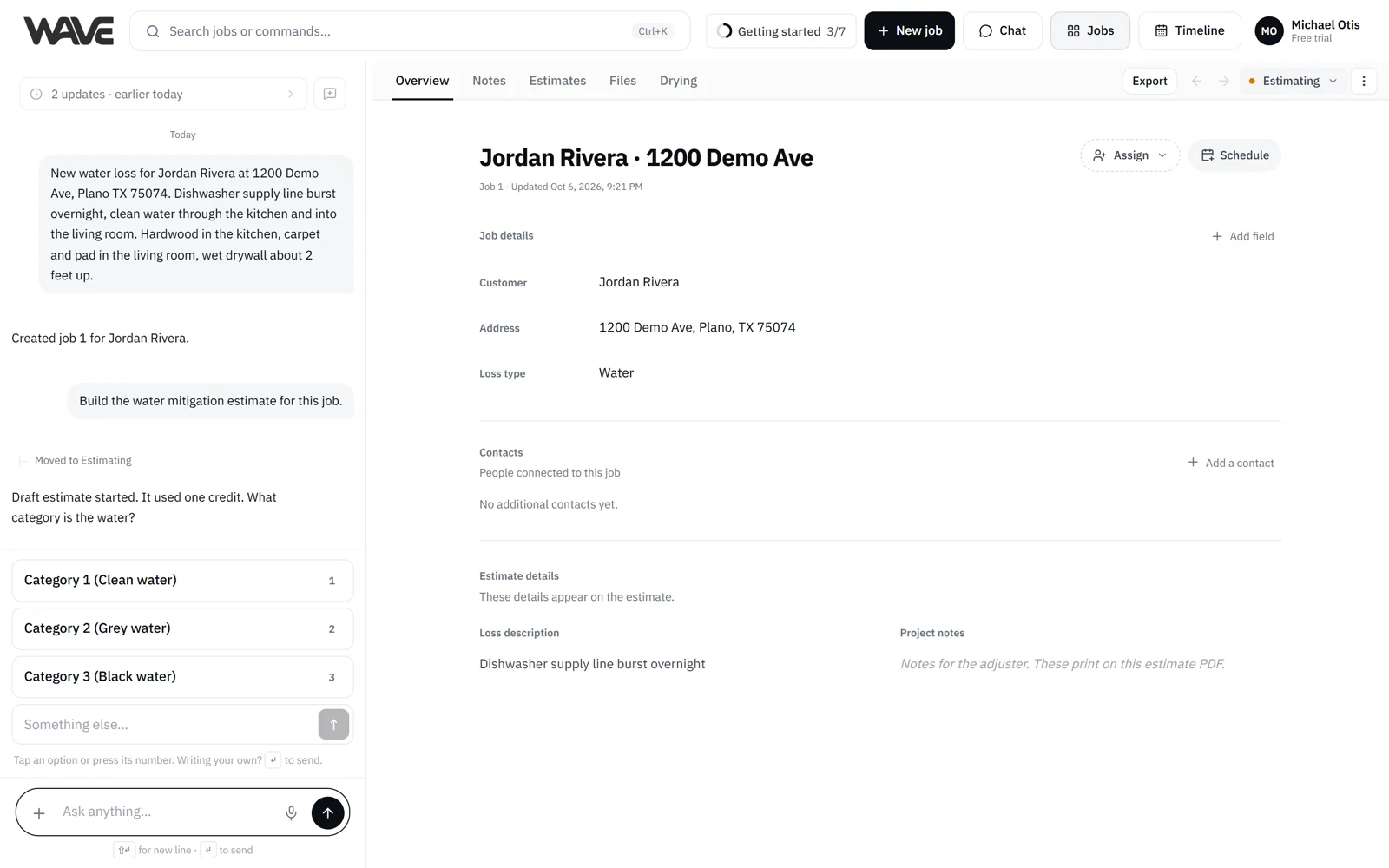
Where the questions happen
You answer in the job's Wave chat. On desktop, the chat sits beside the job, so you can watch the estimate fill in on the Estimates tab while you answer. On a phone, switch the job view to Chat. When Wave is waiting on an answer and you're on another view, a chat bubble with a pulsing dot takes you straight to the question.
One question at a time
Wave asks a single question, waits for your answer, then asks the next. Many questions come with tap-to-answer choices. Tap one to answer instantly, or type or dictate your own answer if none of them fit. While Wave is working, the send button turns into Stop, which you can press to cancel.
Questions that fit the job
Wave builds these kinds of estimates:
- Water mitigation
- Mold remediation
- Asbestos abatement
- Repairs and reconstruction
- Contents (pack-out, storage and pack-back)
- Roofing
- Fire mitigation and fire rebuild
If you haven't said what kind of work it is, Wave starts by asking. From there, the questions follow the work you asked for. See What Wave estimates.
Wave reads your job notes first
If your team has already logged site notes on the job, Wave reads them when the estimate starts. It opens with a short acknowledgment of the notes and builds on what they say, along with the job's details and anything you already said in the chat. If a note says how many air movers and dehumidifiers are on site, Wave prices those counts.
Say it all up front if you like
Put everything you know in one message, typed or dictated. Wave uses everything you said and asks about what's still missing.
The estimate builds as you answer
Rooms, line items and prices appear on the Estimates tab as you go. If something looks off, fix it the moment you see it, by telling Wave or by editing the line by hand.
When you don't know the answer
It's fine to say "I'm not sure." Wave may offer an easier way to answer, such as a few choices. If a number still isn't known, Wave keeps the estimate moving: it states the assumption it made so you can correct it, and a line whose quantity is still unknown waits out of the total until you give the number. Counts you give, like equipment on site, are priced as you stated them. See Answer formats.
When you answer the last question, you're done
When you answer Wave's last question, your estimate is complete. There's nothing to finalize.
Wave may then offer the next estimate the job is likely to need, as a button such as Start the Repairs estimate. One tap starts it, and Wave tells you it used one estimate credit. Choose Not now to put the offer away. See Several estimates on one job.
After the estimate is built
Keep chatting to add rooms, adjust quantities or rework scope, and the estimate updates as you go. Paid plans have no cap on follow-up messages. On the free trial, follow-up chat messages on a finished estimate are capped, and editing by hand is unlimited. See The free trial.
Your conversation follows you
The conversation follows the place you're working in. Moving between a job's tabs keeps it going. Moving to Home or another job, or coming back after a long break, starts a fresh conversation, and the earlier messages fold into the history chip. If Wave was waiting on an answer, Pick up takes you back to it from any tab. New chat starts clean whenever you like.
Answer in your language
Chat with Wave in English, Spanish or French. See Use Wave in your language.
Related
- Make your first estimate: see the questions in context
- Answer formats
- What Wave estimates
- Several estimates on one job: adding the next estimate for the same loss
- How Wave asks instead of guessing